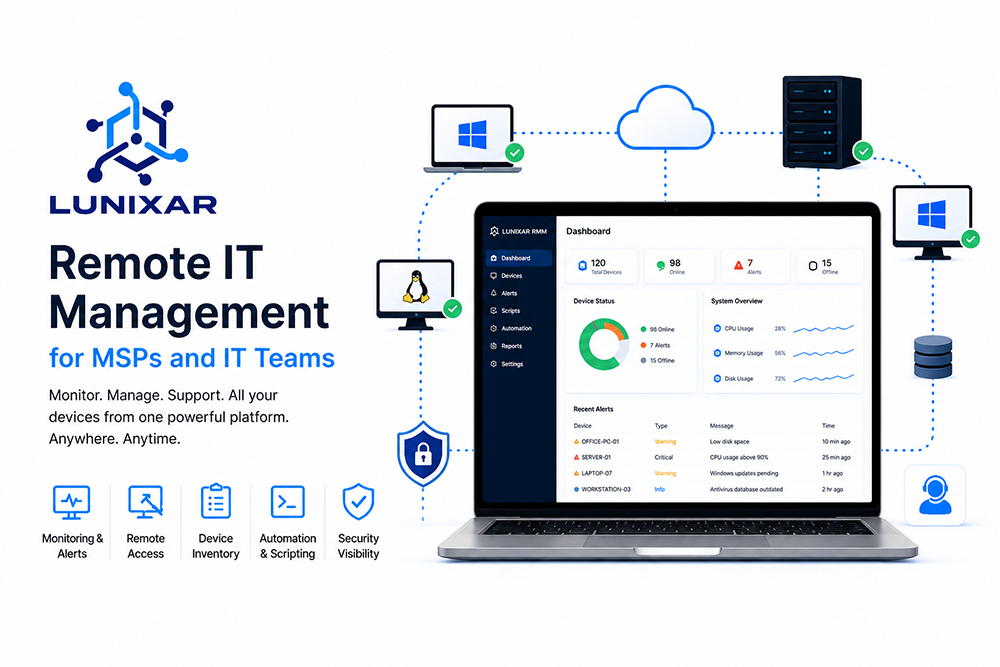
Lunixar RMM helps MSPs and IT teams centralize remote monitoring, remote access, alerts, and device management in one platform. As businesses rely more on distributed devices, cloud applications, and remote work, having better IT visibility is essential to reduce downtime, improve support, and strengthen security operations.
Lunixar RMM is a remote monitoring and management platform designed to help MSPs and IT teams monitor devices, provide remote support, manage alerts, and improve operational visibility from one place. As small businesses depend more on laptops, servers, cloud applications, remote employees, and digital workflows, having a centralized way to manage IT environments is becoming essential.
For many companies, technology is no longer just a support function. It is part of daily operations, customer service, internal communication, sales, productivity, and security. When technology works properly, employees can focus on their jobs. When it fails, the business can quickly lose time, money, and trust.
That is why remote IT management has become so important.
Instead of waiting for users to report problems, MSPs and IT teams can monitor devices, detect issues earlier, connect remotely, run scripts, review system health, and respond faster. This proactive approach helps reduce downtime, improve support quality, and strengthen the overall security posture of the business.
Why remote IT management matters more than ever
Small businesses are using more technology than ever before. Even a company with only a few employees may depend on multiple laptops, email services, cloud storage, accounting software, payment systems, collaboration platforms, cybersecurity tools, and remote access solutions.
As the number of devices and applications grows, managing everything manually becomes harder.
A business may not always know which computers are online, which devices are missing updates, which endpoints have low disk space, which users need support, or which machines are showing signs of poor performance. Without centralized visibility, IT support becomes reactive.
Reactive IT usually means that a problem is only addressed after it has already affected someone.
For example, an employee may report that their computer is slow, but the real cause could be high CPU usage, low memory, too many startup applications, outdated software, malware, or a failing service. Without remote visibility, a technician may need to spend extra time asking questions, collecting information, or walking the user through manual steps.
Remote IT management changes that process.
With the right tools, technicians can see device status, review system information, connect remotely, and troubleshoot faster. This saves time for both the user and the support team.
The problem with managing devices manually
Manual IT management may work for a very small environment, but it becomes inefficient as soon as the business starts growing.
At first, a company may only have a few computers. The owner or a technician may know each device personally. But over time, more employees join, more systems are added, and more devices appear across different offices or remote locations.
Eventually, the company may have:
- Office desktops
- Remote laptops
- Shared workstations
- Servers
- Cloud-connected applications
- User accounts
- Security tools
- Network devices
- Backup systems
- Business-critical software
When there is no centralized system to manage all of this, problems become harder to detect.
Some devices may go months without proper maintenance. Some may have outdated software. Others may have disabled security tools. A server may be running low on storage. A remote employee’s device may be offline for days without anyone noticing.
The result is an IT environment that becomes harder to control.
Remote monitoring and management helps bring order to this environment by giving teams a centralized view of devices and their condition.
What an RMM platform does
RMM stands for Remote Monitoring and Management. An RMM platform helps IT teams and MSPs manage endpoints remotely.
A good RMM solution usually includes monitoring, remote access, inventory, alerting, automation, and reporting. These features help technicians understand what is happening across the environment and take action when needed.
The main goal is simple: help IT teams manage more devices with better visibility and less manual work.
An RMM platform can help answer important questions such as:
Which devices are online right now?
Which computers are experiencing performance problems?
Which devices have low disk space?
Which endpoints need attention?
Which software is installed?
Which users need support?
Which systems may represent a security risk?
Which alerts require action?
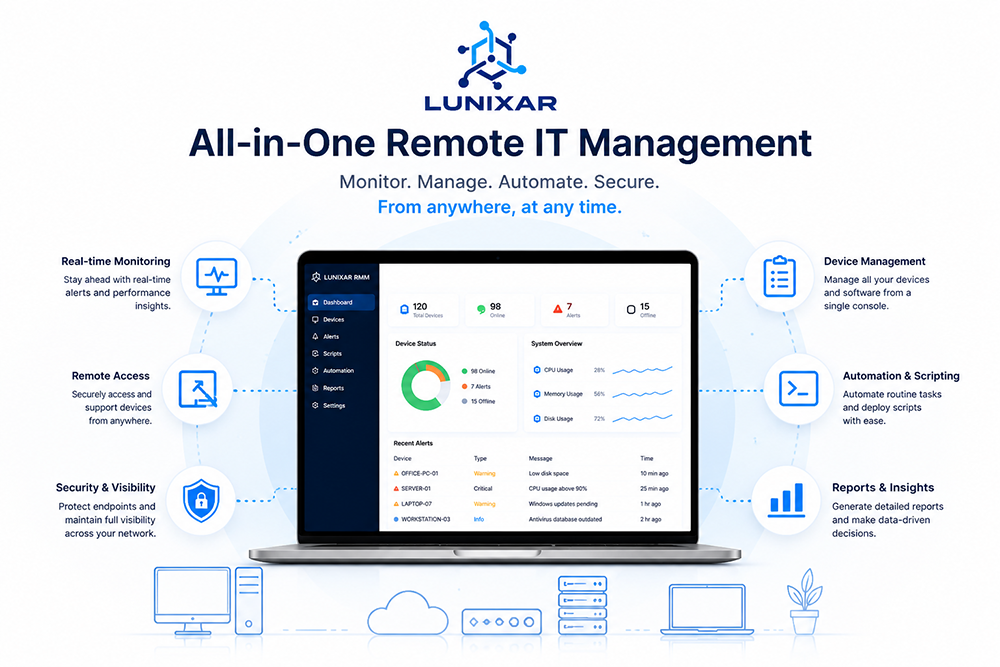
Without an RMM platform, answering these questions can take a lot of manual effort. With an RMM platform, teams can work from a centralized dashboard and respond faster.
Why MSPs need remote monitoring and management
Managed service providers, or MSPs, rely heavily on remote management tools because they usually support many clients at the same time.
An MSP may manage devices for small businesses, professional firms, schools, clinics, accounting offices, manufacturing companies, and other organizations. Each client may have different locations, users, devices, and technical requirements.
Without a centralized platform, supporting all of these environments becomes difficult.
Technicians need to know which client owns each device, where the device is located, what issue is happening, and what action has been taken. They also need a secure way to provide remote support, monitor endpoint health, and respond to alerts.
For MSPs, efficiency matters.
If technicians spend too much time gathering basic information, support costs increase. If alerts are missed, clients may experience downtime. If remote access is slow or unreliable, users become frustrated. If there is no device inventory, planning and maintenance become harder.
An RMM platform helps MSPs deliver more consistent service.
It allows them to organize clients, monitor endpoints, provide support, automate tasks, and improve response times. This makes it easier to scale operations without losing control.
Why small businesses also benefit from RMM
RMM platforms are not only useful for MSPs. Small and mid-sized businesses can also benefit from remote IT management, especially if they have internal IT staff or work with an external provider.
Many small businesses do not have a large IT department. Some may only have one technician. Others may rely on a third-party provider. In both cases, visibility is critical.
A small business cannot afford repeated downtime, slow support, or unmanaged devices. Even a few hours of technical disruption can affect productivity, customer service, and revenue.
Remote IT management helps small businesses become more organized.
Instead of depending on memory, spreadsheets, or user reports, the business can maintain a clearer picture of its technology environment. Devices can be monitored. Issues can be detected earlier. Support can be provided remotely. Maintenance tasks can be standardized.
This creates a more professional and reliable IT operation, even for smaller teams.
Remote access: faster support without being on-site
Remote access is one of the most valuable parts of remote IT management.
When a user has a technical problem, a technician can connect to the computer and troubleshoot directly. This is much faster than trying to explain every step over the phone or waiting for someone to visit the location.
Remote access can help with many common support tasks, including:
- Fixing software issues
- Checking system settings
- Reviewing errors
- Restarting services
- Installing or removing applications
- Helping users configure tools
- Troubleshooting performance problems
- Verifying that a fix worked
For remote employees, this is especially important. If a worker is at home, traveling, or located in another city, on-site support may not be practical. Remote access allows IT teams to help users wherever they are.
However, remote access should always be handled responsibly.
Businesses should use tools that support proper access control, technician accountability, and clear internal policies. Remote access is powerful, so it should be managed carefully.
Monitoring helps detect problems before users report them
One of the biggest advantages of RMM is proactive monitoring.
In a reactive IT model, users report problems after they notice them. In a proactive model, IT teams can detect warning signs before the problem becomes serious.
For example, monitoring can help identify:
- High CPU usage
- High memory usage
- Low disk space
- Offline devices
- Disabled security protection
- Unusual system behavior
- Devices that need attention
- Services that may not be running properly
This does not mean every issue can be prevented. But it does mean IT teams have a better chance of responding before the issue affects the entire business.
Low disk space is a simple example.
If a server or workstation runs out of storage, applications may fail, updates may not install, files may not save, and users may experience errors. But if IT receives an alert before storage becomes critical, the issue can be resolved early.
The same idea applies to performance, security, and availability.
Better visibility leads to faster action.
Automation reduces repetitive IT work
IT teams often repeat the same tasks many times.
They may need to collect logs, run commands, restart services, install software, check system status, clean temporary files, or apply known fixes. Doing this manually on every device can waste a lot of time.
Automation helps reduce that burden.
With remote IT management, technicians can execute scripts, schedule actions, and standardize common tasks across devices. This makes support more efficient and consistent.
For MSPs, automation can improve profitability because technicians can handle more work without spending time on repetitive manual steps. For internal IT teams, automation helps maintain systems more consistently, even with limited staff.
Automation also reduces human error.
When a task is performed manually, different technicians may do it in slightly different ways. With automation, the process can be standardized and repeated more reliably.
This is especially useful for maintenance tasks, diagnostics, and routine checks.
Inventory gives IT teams better control
Device inventory is another important part of remote IT management.
A business should know what devices it owns, what software is installed, and what systems are being used. Without this information, IT planning becomes difficult.
Inventory can help answer questions such as:
How many devices does the business have?
Which operating systems are being used?
Which computers may need replacement?
Which software is installed on each device?
Are there unauthorized or outdated applications?
Which devices belong to each location or department?
This information is useful for support, budgeting, compliance, security, and planning.
For MSPs, inventory is also useful when discussing strategy with clients. Instead of guessing, the MSP can provide recommendations based on real device data.
For example, if many devices are outdated, the MSP can propose a replacement plan. If certain software appears across many endpoints, it can be reviewed for licensing or security concerns.
Good inventory improves decision-making.
Security visibility is essential
Cybersecurity is not only about advanced tools. It also depends on basic visibility and operational discipline.
Many security incidents begin with simple weaknesses:
- Outdated systems
- Missing patches
- Disabled antivirus
- Weak configurations
- Unknown devices
- Unmonitored endpoints
- Users installing risky software
- Lack of centralized alerts
If IT teams cannot see these issues, they cannot respond to them.
Remote IT management helps improve security visibility by showing the condition of devices and alerting teams when something needs attention.
This does not replace dedicated cybersecurity tools such as endpoint detection and response, firewalls, email protection, backups, or SIEM platforms. But it supports the overall security program by helping teams manage endpoints more effectively.
For small businesses, this is very important.
They may not have a full security team, but they still need to reduce risk. Having better visibility into endpoint health is one of the practical steps they can take.
For MSPs, security visibility can also become a competitive advantage. Clients increasingly expect their IT providers to help reduce risk, not just fix computers.
Why downtime is expensive
Downtime does not only affect technology. It affects the entire business.
When systems stop working, employees may be unable to complete their tasks. Customers may experience delays. Sales may be interrupted. Internal communication may slow down. Important deadlines may be missed.
Even small technical problems can become expensive when they happen repeatedly.
For example, if several employees lose productivity because of slow computers, the cost may not appear as a single large incident. But over weeks or months, the lost time adds up.
Remote IT management helps reduce downtime by allowing IT teams to detect issues earlier and respond faster.
The faster a technician can understand the problem, the faster the user can return to work.
This is one of the reasons RMM platforms are valuable for both MSPs and internal IT teams. They help turn support from a slow, manual process into a more efficient and visible operation.
Better IT support improves employee productivity
Employees usually do not care which IT tools are used behind the scenes. They care about whether their devices work and whether support is fast when something goes wrong.
Remote IT management improves the employee experience because technicians can support users more efficiently.
Instead of asking the user to explain every technical detail, the technician can review the device directly. Instead of waiting for an on-site visit, many issues can be resolved remotely. Instead of guessing, the technician can work with real system information.
This reduces frustration for users.
It also reduces pressure on IT teams. When technicians have better tools, they can handle support requests more professionally and with less wasted time.
In the long run, good IT support helps create a better workplace.
People can focus on their work instead of fighting with technology.
RMM helps create a proactive IT culture
A proactive IT culture means that the business tries to prevent problems instead of only reacting to them.
This does not happen automatically. It requires visibility, processes, tools, and discipline.
An RMM platform supports this culture by helping teams monitor devices, respond to alerts, automate maintenance, and organize support activity.
Instead of asking, “What broke today?” IT teams can ask better questions:
Which systems are showing early warning signs?
Which devices need maintenance?
Which alerts should be prioritized?
Which recurring issues should be automated?
Which clients or departments need attention?
Which devices may create security risk?
This mindset is important for MSPs that want to provide high-value service. It is also important for businesses that want to reduce downtime and improve operational control.
Proactive IT is not about eliminating every problem. That is impossible.
It is about reducing surprises and responding with better information.
Choosing the right RMM platform
Not every RMM platform is the same. Some are designed for large enterprises. Some are focused on MSPs. Some are simple and lightweight. Others include many advanced features but may require more time to configure.
When choosing an RMM platform, businesses and MSPs should consider what they actually need.
Important factors include:
- Ease of use
- Remote access capabilities
- Monitoring features
- Alerting
- Device inventory
- Script execution
- Security visibility
- Multi-tenant organization for MSPs
- Pricing structure
- Reliability
- Support
- Future roadmap
The best platform is not always the one with the most features. It is the one that helps the team solve real problems efficiently.
For small MSPs, simplicity and cost control may be very important. For growing MSPs, scalability and multi-client organization may matter more. For internal IT teams, ease of use and reliable remote support may be the top priorities.
A good RMM platform should make daily work easier, not more complicated.
Where Lunixar RMM fits in
Lunixar RMM is designed for MSPs and IT teams that need a practical way to monitor, support, and manage devices remotely.
Its goal is to help teams centralize important IT operations in one platform, including device monitoring, remote access, alerts, and operational visibility.
For MSPs, this can help simplify client support. Instead of jumping between disconnected tools or relying only on manual processes, technicians can work from a more centralized view.
For small businesses, Lunixar RMM can help create a more organized IT environment by giving teams better visibility into their devices and making remote support easier.
This matters because modern IT is not only about fixing problems after they happen. It is about having the information and tools needed to act faster, reduce risk, and support users with confidence.
Businesses and service providers that want to modernize their IT operations can explore Lunixar RMM pricing and start building a more proactive support model.
RMM is especially useful for distributed teams
Remote and hybrid work have changed how IT support is delivered.
In the past, many employees worked from the same office. If a device had a problem, someone from IT could walk over and help. Today, employees may work from home, from another city, from a client site, or while traveling.
This makes remote management much more important.
IT teams need a way to support devices regardless of location. They also need to monitor those devices even when they are not connected to the office network.
RMM platforms help solve this challenge.
They allow technicians to manage endpoints remotely, provide support, and maintain visibility across distributed environments.
For MSPs, this is even more important because their clients may be spread across different cities, industries, and time zones.
Remote management gives service providers the flexibility to support clients without being physically present.
The relationship between RMM and cybersecurity
RMM and cybersecurity are closely connected, but they are not the same thing.
Cybersecurity focuses on protecting systems, users, data, and networks from threats. RMM focuses on monitoring and managing devices. However, strong device management supports better cybersecurity.
For example, if IT teams know which devices are online, which systems are outdated, and which endpoints have security issues, they can respond more effectively.
An unmanaged device is a risk.
If nobody knows its status, nobody knows whether it is secure. If nobody receives alerts, nobody knows when something changes. If nobody can access it remotely, response may be delayed.
RMM helps reduce this blind spot.
It gives IT teams operational visibility, and operational visibility is one of the foundations of good security.
For MSPs, this is especially relevant because clients often expect them to help with security, even if the MSP is not a full MSSP. Having better endpoint visibility allows the provider to deliver more responsible and proactive support.
Remote IT management supports compliance and documentation
Many industries require businesses to maintain certain standards around data protection, access control, system maintenance, or operational documentation.
Even when a business is not formally regulated, documentation still matters.
IT teams should know what devices exist, who uses them, what software is installed, and what issues have occurred. This information helps with audits, internal reviews, client reporting, and planning.
RMM platforms can support better documentation by centralizing device information and support activity.
For MSPs, documentation also improves client communication.
Instead of only saying that work was done, the MSP can provide clearer information about device status, alerts, maintenance, and support actions. This can help clients understand the value of the service.
Good documentation also helps when technicians change, clients grow, or incidents need to be reviewed.
Reducing technician workload
Technicians often deal with many requests at the same time. Some are urgent. Some are repetitive. Some require investigation. Others could be resolved quickly if the technician had the right information.
RMM helps reduce technician workload by making support more efficient.
Instead of manually collecting basic details from the user, the technician can review device information. Instead of visiting the location, the technician can connect remotely. Instead of repeating the same task on many computers, the technician can use automation.
This does not remove the need for skilled technicians. It helps them use their time better.
When technicians are not overloaded with repetitive work, they can focus on more important tasks such as improving systems, planning upgrades, strengthening security, and helping users more effectively.
For MSPs, this can directly improve profitability.
For internal IT teams, it can improve morale and reduce burnout.
Why centralized visibility matters
Centralized visibility is one of the most important benefits of remote IT management.
Without it, IT teams are forced to work with incomplete information. They may know about some devices but not others. They may see some issues but miss others. They may depend heavily on users to report problems.
With centralized visibility, IT becomes more controlled.
Teams can see devices, monitor health, review alerts, and take action from one platform.
This is especially important as businesses grow. The more devices and users a company has, the harder it becomes to manage everything manually.
Centralized visibility helps prevent IT from becoming chaotic.
It also helps business leaders understand their technology environment better. They can see that IT is not just a cost center. It is a system that needs monitoring, maintenance, and continuous improvement.
RMM helps MSPs deliver better client service
MSPs compete on trust, reliability, response time, and value.
Clients want to know that their provider is watching their systems, responding to issues, and helping prevent problems. They do not want to feel like their MSP only appears after something breaks.
An RMM platform helps MSPs deliver a more professional service.
It allows them to monitor devices, receive alerts, provide remote support, automate maintenance, and maintain better records. This can improve the client experience and help the MSP show measurable value.
For example, an MSP can explain that it detected low disk space before it caused downtime. Or that it helped a remote employee within minutes. Or that it identified devices that needed attention.
This turns IT support into a more proactive and transparent service.
Clients appreciate providers who can solve problems quickly, but they value providers even more when they help prevent problems.
The future of IT management
Technology environments will continue to become more complex.
Businesses are using more cloud services, more devices, more remote work, more security tools, and more digital processes. At the same time, cyber risks continue to increase, and users expect faster support.
This means IT teams need better tools.
Manual management will become less practical. Reactive support will become less acceptable. Businesses will expect more visibility, more automation, and faster response.
RMM platforms will continue to play an important role in this future.
They help IT teams and MSPs manage complexity by centralizing visibility and action.
The future of IT support is not only remote. It is proactive, automated, secure, and data-driven.
Final thoughts
Remote IT management has become essential for MSPs and small businesses that want to stay productive, secure, and prepared.
It helps teams monitor devices, support users faster, automate repetitive tasks, improve security visibility, reduce downtime, and manage IT environments with more confidence.
For MSPs, RMM platforms are a foundation for delivering reliable service at scale. For small businesses, they provide structure and visibility that can prevent technology from becoming disorganized or risky.
Lunixar RMM is part of this modern approach to IT management. By helping MSPs and IT teams centralize monitoring, remote access, alerts, and device visibility, it supports a more proactive way of managing technology.
As businesses continue to depend more on digital systems, remote IT management will become even more important. The companies and service providers that invest in better visibility today will be better prepared for tomorrow’s challenges.