Why Sitting Can Make Your Back Protest
Office hours can seem peaceful, but the body is working hard to maintain posture against gravity. Your spine suffers when the chair doesn’t fit. Lingering on the edge or toward a screen makes your lower back a shock absorber. To compensate, muscles tighten, spine curvature flatten or exaggerate, and lumbar pain spreads to the neck and shoulders. Strain can deplete energy, impair focus, and lower mood. Antidotes go beyond cushioning. Support that suits and moves with you.
What Makes A Chair Truly Ergonomic
An ergonomic chair is not a fancy label. It is a set of features that encourage neutral alignment and reduce pressure points. The goal is simple: keep your feet grounded, hips open, spine supported, and arms relaxed, while allowing small body adjustments through the day. Customization is the heartbeat of ergonomics. The more you can dial in the chair to your proportions and your desk setup, the better your back will feel.
Core Features To Look For When You Buy
Adjustable seat height lets you set your knees at roughly a right angle with feet flat on the floor. Thighs should sit parallel to the ground, with hips slightly above knee level to ease the load on the lower back. If you are shorter and the desk is high, a compact footrest can bridge the gap. If you are taller, look for a chair with a higher cylinder so your legs are not cramped.
Lumbar support matters most for the natural inward curve of your lower spine. A good lumbar feature allows height and depth adjustments. You should feel gentle pressure that invites you to sit upright without forcing you forward. If the support hits too high or too low, your back will round and fatigue will follow.
Seat depth and width determine how your weight is distributed. The seat pan should be wide enough for your hips and deep enough to support your thighs, yet leave two to three centimetres between the seat edge and the back of your knees. That small gap protects circulation. Many chairs include a sliding seat that lets you fine tune this distance.
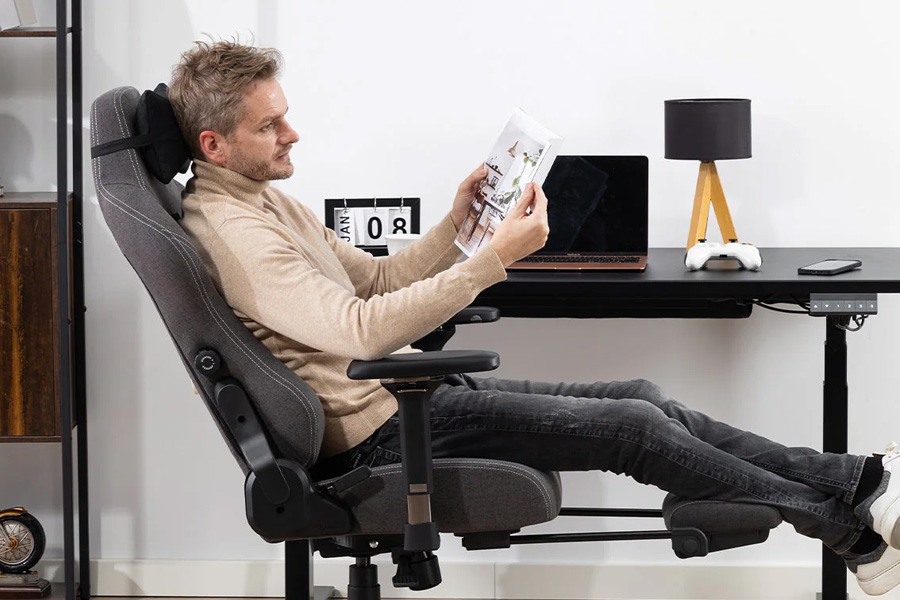
Backrest recline and tension encourage movement. Look for a tilt that can be locked and unlocked, with adjustable resistance. A slight recline opens the hip angle and reduces spinal compression. The best chairs allow a smooth transition, like a gentle wave you can ride through the day.
Armrest adjustability reduces shoulder strain. Height, width, pivot, and depth adjustments help you position elbows close to your torso at about a right angle. Wrists should float above the desk without shrugging your shoulders. If armrests are too high or too far apart, you will hunch or flare your arms and the upper back will complain.
Swivel and quality casters assist easy reaching without twisting. You should be able to rotate and move around your workstation smoothly. Match the caster type to your floor. Soft casters help on hard surfaces, while hard casters suit carpet. Mobility prevents awkward stretches that torque the spine.
Seat comfort goes beyond foam. Breathable mesh can keep you cool and contour to your shape. Padded fabric or leather can provide plush support but should not collapse under weight. Look for rounded front edges to avoid pressure under the thighs, and a stable base with five spokes for balance.
Headrests are optional but helpful if you lean back often or work through calls. A height and angle adjustable headrest supports the base of the skull without pushing your head forward.
How To Set Up Your Chair For Your Body
Begin at the floor. Place your feet flat, hip width apart. If the floor is out of reach, add a footrest. Adjust seat height so your knees form a comfortable right angle and hips sit slightly higher than knees.
Dial in the seat depth. Slide the seat until you feel stable thigh support with that small knee gap. Check that the seat does not press into your calves.
Set lumbar support. Move it up or down until it nestles into your lower back’s curve. Adjust depth to firm but not hard. If you feel pushed off the seat, ease the pressure back.
Tune the recline and tension. Unlock the backrest and lean in and out. The chair should follow you without snapping. Aim for a recline that opens your hip angle while keeping the screen visible.
Position armrests. Raise or lower until your shoulders relax. Move them inward so elbows rest close to your torso. If they block your chair from sliding under the desk, adjust depth or look for low profile arms.
Align Your Workspace To Your Chair
Your monitor should meet your eyes, not your neck. Place the top of the screen around eye level and arm’s length away. If you use dual monitors, center your dominant screen and angle the second toward you to reduce twisting.
Keep your keyboard and mouse within easy reach. Elbows should rest near your sides with forearms floating straight to your inputs. Consider a keyboard tray if your desk height is fixed and too high.
Organize frequently used items within a simple arc in front of you. If you find yourself leaning forward to grab a notebook or phone, bring it closer or adjust your chair instead of your spine.
Move Often, Even In A Great Chair
Your chair is a partner, not a cure. Small doses of movement refresh circulation and ease joint strain. Stand, stretch, or walk for a minute every 30 to 60 minutes. Alternate between upright sitting and a gentle recline. Think of posture like breathing. It changes naturally. Let your chair support those micro shifts.
Buying Online With Confidence
Measure yourself and your space before you click buy. Check seat height range against your leg length. Review seat width and depth against your hip and thigh measurements. Confirm the maximum user weight and the base width for stability. If you are between sizes, look for models with extended cylinders or sliding seat pans. Read the return policy, and plan a short setup period to test adjustments. Your back will tell you quickly if the fit is right.
Signs Your Chair Fits
You feel supported without feeling pinned. Your lower back enjoys gentle contact. Feet rest flat and legs feel light. Shoulders relax, and hands land on the keyboard without shrugging or reaching. You can lean, swivel, and reach your desk with minimal twisting.
Red Flags To Avoid
Your knees press into the seat edge. Your lumbar support sits too high and pushes your ribs. The armrests force your elbows outward. You must perch to see your screen. You cannot unlock the backrest or adjust the tension. If any of these happen, the chair does not meet your body where it needs support.
FAQ
Is a headrest necessary for office work?
A headrest is helpful but not essential. It benefits people who recline often, take calls, or want occasional neck support during breaks. If you sit upright most of the day and keep your screen at eye level, a well designed backrest can handle neck comfort without a headrest.
What seat height should I choose relative to my desk?
Aim to set seat height so your elbows are close to a right angle when your hands rest on the keyboard. If your desk is fixed and high, raise the chair and use a footrest so your feet stay grounded. If the desk is adjustable, lower it until forearms are level with the work surface and shoulders stay relaxed.
Are mesh chairs better than padded chairs for back pain?
Neither material is universally better. Mesh can breathe and conform, which helps if you run warm or want light, responsive support. Padded chairs can offer plush comfort and distribute pressure well, which helps if you prefer a softer feel. The key is lumbar adjustability, seat dimensions, and recline function. Choose the build that supports your posture consistently.
How often should I get up during the day?
A brief stand, stretch, or walk every 30 to 60 minutes maintains circulation and eases stiffness. Even 60 seconds of movement helps. Pair those breaks with small posture changes, like shifting from upright sitting to a gentle recline and back again.
Can a chair alone fix chronic back pain?
A well fitted chair reduces strain and can ease symptoms, but chronic pain often reflects multiple factors, including movement patterns, strength, and daily habits. Use your chair as part of a broader routine that includes regular breaks, desk alignment, and simple mobility work. If pain persists, consult a qualified professional for tailored guidance.
What if I am very short or very tall?
Look for chairs with several adjustments. Lower seat heights, sliding chairs, and footrests help shorter users’ legs. Higher cylinders, deeper seats, and taller backrests are needed for taller users. Before purchase, compare seat height range, seat depth, and backrest height to your measurements.